This interactive demo was created free with Storylane in 2 minutes. Create your own demo
Start free
All Tutorials /Cisco Webex

How to Record on Webex

Updated on:
June 5, 2026
By:
Madhav Bhandari
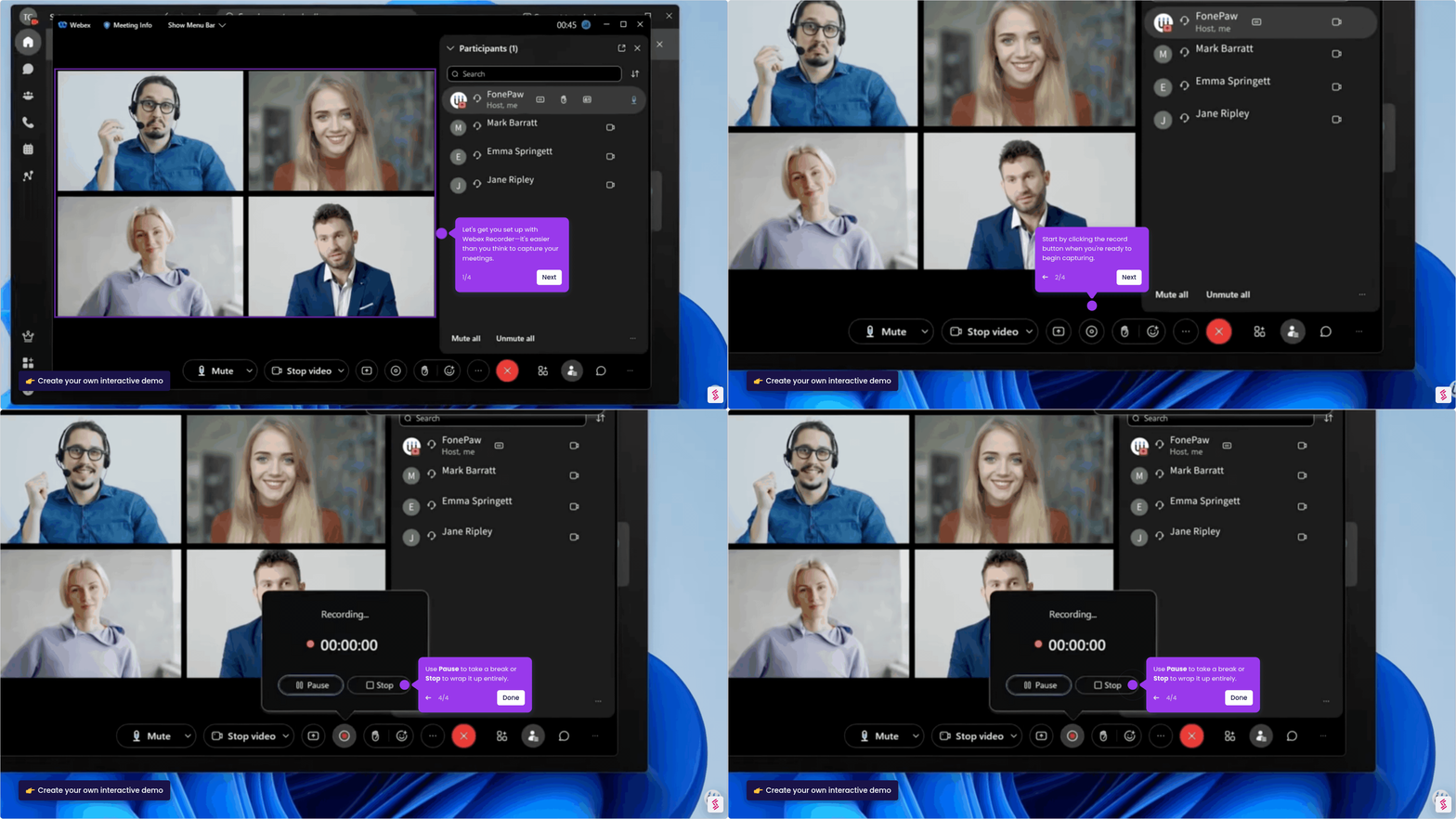
Use this interactive demo to learn how to start and stop a recording in your Webex meeting.

Quick summary

Recording a Webex meeting takes just a few clicks — join a session, hit the Record button in meeting controls, and stop when done. Your recording file is saved automatically and ready to share immediately after the meeting ends.


Steps

  1. Join or start an active Webex meeting — recording requires a live session to be in progress.
  2. Click the Record button in the meeting controls at the bottom of your screen.
  3. Click Record again in the confirmation prompt to begin recording.
  4. When finished, hit Stop — your recording file is saved automatically and ready to share.
📌 Why this matters

Recording Webex meetings ensures that key conversations, decisions, and presentations are never lost — participants who miss a live session can catch up on demand. Webex's built-in recording feature eliminates the need for third-party screen-capture tools, keeping recordings secure within your organization's workflow. Automatic file saving and instant shareability make it easy for teams to distribute meeting content without manual effort. For businesses relying on Webex for collaboration, mastering meeting recording directly improves productivity and knowledge retention.
Your product deserves an interactive demo
Start free
Similar Articles
How to Share Video with Audio on WebexHow to Share Video with Audio on Webex
Cisco Webex

How to Share Video on Webex with Audio

Madhav Bhandari
Director of Marketing @ Storylane
How to Record a Meeting with Webex RecorderHow to Record a Meeting with Webex Recorder
Cisco Webex

How to Use Webex Recorder

Madhav Bhandari
Director of Marketing @ Storylane
How to Test Webex Before a MeetingHow to Test Webex Before a Meeting
Cisco Webex

How to Test Webex Before Meeting

Madhav Bhandari
Director of Marketing @ Storylane
No items found.
Platform
Interactive Demos
Sandbox Demos
Hubs
RepX
Integrations
Solutions
Product Marketers
Growth & Demand Gen
Sales Reps & AEs
Presales & SEs
Customer Success
Product Managers
Customers
Demo Showcase
Customer Stories
Finer Demos Club
Features
Demo Signals
Personalization
Deal Intelligence
Resources
Blog
The Plot
Tutorials
Help Docs
What’s New
Demo Dundies
Company
Careers
Pricing
Partners
Contact
Trust Center
Backed by
Chrome Extension Icon
Chrome extension
Download
Desktop app
Download
Built in San Francisco Bay Area - ©2026 Storylane
Privacy PolicyTerms & Conditions
X Corp (formerly Twitter)LinkedIn
This website uses cookies to ensure you get the best experience on our website. Learn More
Got it
This website uses cookies to ensure you get the best experience on our website. Learn More
Got it